- Joined
- Sep 11, 2023
- Messages
- 616
 Customizing Your CPA Landing Page Made Easy!
 When you get a CPA Landing page, you usually want to personalize it for your specific topic and include your own content lock. Using Our Ready to Use CPA templates makes this customization process super simple.
We aim to design all our templates similarly, so once you know how to edit one, it becomes straightforward to edit the rest
This process shouldn’t generally take more than 5 minutes depending on the niche. Sometimes you just have to add your own content locker URL, and you can edit the whole template according to your niche if you want.
You will generally receive a ZIP file that contains everything you need. We organize all the landing pages in the same way, and the most important files for your customization are index.html and in the /img folder.
Index.html is where you add your content locker URL and you can edit all the text in the template. /img is the folder where all the useful images of the template are.
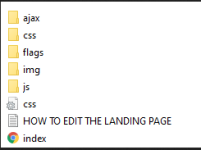
Our landing page templates are based on the same Variables to customize
We use a simple list of variables, that will be very useful to edit your landing page.
In the index.html file:
- LOCKERURL – This is where you need to insert the content locker URL.
- MYGAME – You can substitute it with your niche game or any other niches. It will be beneficial for multi-niche templates.
- RESOURCE1 – Replace it with the resource of your game; this is only relevant for game niche templates.
- RESOURCE2 – Same as RESOURCE1, only applicable if the targeted game has two resources to generate.
- bg.jpg – Background image
- favicon.png (or alternate size name) – The template icon
- logo.png – The template logo
- resource1 – Icon for the first resource in your niche
- resource2 – Icon for the second resource in your niche
Edit the index.html file with a Code Editor
The first step is to edit the index.html file to add your own customization and content locker URL. You will need a code editor to open the HTML file as text and add your own customization.
You can preview your landing page at any moment just by opening the index.html file with your web browser. All the landing pages are supposed to work the same when they are open locally on your web browser and also when they are hosted.
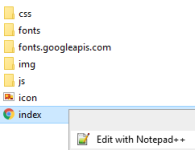
I personally use Notepad++, and I recommend it if you are a beginner; plus, this tutorial uses Notepad.
If you want to use another editor, you can check this list, which lists the 12 best code editors. When you have downloaded Notepad or the code editor of your choice, you can open the index.html file (right-click and select Edit with Notepad++).
Now, you can scroll and manually search for everything, but there’s something really faster, especially with our template. You can use the "find" option, which allows you to replace all the terms in one go.
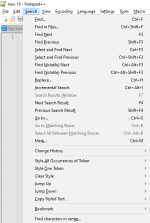
You can click on search/find or use the shortcut Ctrl+F to access the “Find” function.
Use the macro list above to start editing your template.You can start by typing “LOCKERURL” in the "Find what" section, and then add your own locker URL in the "Replace with" section. Then click on “Replace” or “Replace all”, and that’s it!
Your locker is now implemented on the CPA landing page. Save your editing (shortcut: Ctrl+S), open the landing page, and you should see your locker appear at the end.
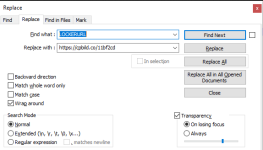
Now that your locker URL is implemented in your LP, you could start to make money right away.
Anyway, in most cases, there’s a bunch of optimization you could add to make your template more unique or better fit your niche. You can use the list of macros above (LOCKERURL, MYGAME, RESOURCE1, RESOURCE2) and repeat the process.

When you are done with the customization and you think your landing page is good enough to make money, you can compress it and upload it to your hosting server.